GajShield Threat Intelligence

Live protection updates from GajShield's indigenous security research and threat intelligence team.

This page documents new and updated detections developed for GajShield security engines, including IPS, Anti-Malware, malicious infrastructure and emerging threat intelligence.

IPS Signature Sep 23, 2026

GajIPS - IPS Signature Update — GS TROJAN: malicious npm package tw-pkgprobe-7731 tarball download

Severity: HIGH · Priority: P2 — malicious npm package fetch, investigate on hit

This rule raises an alert when a device on your network downloads the malicious npm package tw-pkgprobe-7731 from a package registry. The package was documented by ReversingLabs in September 2026 and deliberately disguised itself as an authorised security-research tool for Twilio's official bug-bounty programme, to trick Twilio developers into installing it without suspicion. Once installed, it checks whether it is running inside a Twilio developer environment and exits immediately if not — a targeting mechanism that also helps it evade sandbox analysis. In a Twilio environment, it harvests environment variables, credentials, Twilio Account SIDs and Auth Tokens, and AWS instance metadata, and exfiltrates them via webhook. Later versions also scanned the host's installed packages and injected malicious code into existing node_modules directories.

A hit indicates a developer machine on your network is downloading this package — the only moment before its malicious code executes. Treat it as an active installation attempt: block the download immediately if possible, identify the developer and the project, and confirm whether any version of this package was already successfully installed. Because the package harvests Twilio credentials (Account SID and Auth Token) and AWS metadata, treat those as exposed: rotate the Twilio Auth Token and any other credentials or API keys reachable from that developer's environment, from a known-clean system, and check whether any of the harvested credentials have already been used by the attacker. Audit the project's package.json and node_modules for the injected PoC package the malware plants in matching directories.

Antivirus Sep 23, 2026

GajAV - Malware Signature — Macfinger ClickFix campaign AMOS stealer components

Severity: HIGH · Priority: P2 — macOS ClickFix infostealer infection, investigate on hit

These signatures detect files from the Macfinger ClickFix campaign. The campaign targets macOS users by injecting a script into legitimate, compromised websites — mostly small and mid-sized businesses running WordPress — that shows visitors a convincing fake "Bot Protection" verification screen. When a Mac user follows the on-screen instructions, they are tricked into pasting a command into their own Terminal window. That command downloads and installs a variant of Atomic macOS Stealer (AMOS), malware designed to harvest cryptocurrency wallets, saved passwords, browser sessions, and macOS Keychain contents. The ClickFix technique is deliberately chosen to bypass browser and antivirus protections built to catch file downloads, since the user is instructed to run the command themselves.

The campaign is notable for its scale and resilience: new command-and-control infrastructure arrives in bursts and the cumulative hostname count exceeded 150 distinct addresses within weeks. The AMOS variant delivered here is assessed as distinct from earlier non-ClickFix AMOS campaigns, though it belongs to the same malware family and its network activity is covered by companion network detection rules. These signatures identify the injected ClickFix script, the bash shell dropper the victim runs in Terminal, and the AMOS stealer binary for both Apple Silicon and Intel architectures.

If GajAV flags one of these files, treat it as a probable macOS compromise: identify the Mac and user, and — because AMOS harvests browser credentials, cryptocurrency wallets, session tokens, and Keychain secrets — treat those as exposed. From a known-clean device, reset the user's passwords and revoke active sessions, prioritising cryptocurrency wallets and any browser-stored financial or corporate credentials. Inspect the Mac for AMOS persistence mechanisms and remove them; reimaging is the safest remediation. Check whether the user recently visited an unfamiliar website that showed a CAPTCHA-style verification prompt.

IPS Signature Sep 22, 2026

GajIPS - IPS Signature Update — GS EXPLOIT: WordPress Comment2Shell CVE-2026-93485 unauthenticated stored XSS injection

Severity: HIGH · Priority: P2 — unauthenticated stored XSS enabling admin-session RCE, investigate on hit

This rule detects an attempt to exploit Comment2Shell, a vulnerability in WordPress Core fixed in version 7.1.1 on September 17, 2026. The flaw lets an anonymous visitor post a comment that carries no visible script, yet when a logged-in administrator later views the page, the comment executes code in that administrator's browser — and through the administrator's own session, can then install malicious plugins or execute code on the server. No attacker account is needed; the payload goes through the ordinary public comment form.

The trick is a line break placed inside the attribute of one of the HTML tags WordPress permits in comments. WordPress's comment sanitiser has no reason to remove line breaks, so the payload passes through unchanged. A separate WordPress formatter, which turns line breaks into paragraphs, later rearranges the tag structure in a way that moves the attacker's text into a position the browser treats as a live event handler. The handler is set to fire automatically as the page loads, without any click required. This rule watches for that specific pattern — an allowed tag whose attribute contains a newline followed by an event handler assignment — arriving through the comment submission path.

A hit indicates someone is actively trying to plant a malicious comment on one of your WordPress sites. Confirm whether the targeted site is running WordPress 7.1.1 or later; if not, treat the site as potentially already holding a malicious stored payload — check recent comments for unusual content, and update immediately. Because the comment is stored and fires against whoever views it next, a successful plant means the next administrator to open the site could unknowingly trigger code execution. Updating WordPress Core to 7.1.1 or later removes the flaw; in the interim, requiring comment moderation before comments are published prevents stored payloads from reaching administrators, though it is not a substitute for patching.

IPS Signature Sep 22, 2026

GajIPS - IPS Signature Update — GS TROJAN: SideCopy (TAG-140) spear-phishing campaign targeting Indian academia, ReverseRAT C2 and delivery detection

Severity: HIGH · Priority: P2 — targeted nation-state espionage against Indian institutions, escalate on hit

These rules detect network activity from a SideCopy campaign documented by Trellix and reported on 22 September 2026. SideCopy is a Pakistan-linked state-sponsored espionage group (tracked as TAG-140 by Google) that has operated against Indian and Afghan government, defense, and now academic targets since at least 2019. This campaign marks a deliberate expansion of targeting: where SideCopy historically focused on Indian government and defense entities, it is now actively pursuing Indian academic institutions and universities — reflecting, in Trellix's assessment, a broadening of strategic intelligence-collection priorities.

The attack reaches victims through spear-phishing emails delivering a ZIP archive containing a Windows shortcut file disguised as a document. Opening the shortcut causes Windows to silently fetch a malicious script from the delivery server and execute it, which in turn loads the ReverseRAT backdoor through a multi-stage chain that includes in-memory execution and self-deletion to limit forensic traces. Once resident, ReverseRAT can harvest credentials, screenshots, clipboard content, system information, and files, execute commands, maintain persistent remote access, and upload stolen material. Stolen data is encrypted with a hard-coded key and exfiltrated over a non-standard port to attacker-controlled infrastructure. The delivery and C2 domains both use themes — "docsportal" and "education portals" — deliberately crafted to blend in with the academic and government sectors being targeted.

A hit on the delivery domain or C2 rules indicates contact with confirmed SideCopy infrastructure, which strongly suggests a device on your network has been targeted or is infected. Identify the device and user immediately: if the delivery domain was contacted, check whether the user recently opened a ZIP attachment or ran a document from an email, and inspect the machine for the ReverseRAT implant and its registry-based persistence. If the C2 domain or IP was contacted, treat the machine as actively controlled by the attacker — isolate it, and assume all credentials, documents, and data accessible from it have been harvested and exfiltrated. From a known-clean device, reset affected credentials and revoke active sessions. For confirmed infections, forensic investigation should account for the malware's self-deletion of early-stage components, which limits file-based evidence.

For Indian academic organisations, this campaign is a direct warning: research institutions, universities, and organisations collaborating with Indian government and defense entities on sensitive topics are now within this actor's active targeting scope. Incidents should be reported to CERT-In (cert-in.org.in). All rules are alert-only; they do not block traffic.

IPS Signature Sep 22, 2026

GajIPS - IPS Signature Update — GS EXPLOIT: Arista VeloCloud Orchestrator unauthenticated privilege escalation, CVE-2026-93952

Severity: CRITICAL · Priority: P1 — active exploitation of a maximum-severity SD-WAN control-plane flaw, escalate on hit

These rules detect attempted exploitation of a maximum-severity flaw in Arista's VeloCloud Orchestrator, the server that manages and controls all Edge devices in a VeloCloud SD-WAN deployment. The flaw lets an unauthenticated attacker access internal privileged functions and take over the orchestrator host with no credentials. The risk extends well beyond the orchestrator itself: a compromised VCO may also give attackers access to all the SD-WAN Edge devices it manages, potentially turning the control plane into a pivot point into the entire network it governs. The flaw only affects on-premises VCO deployments where certificate-based authentication between Edges and the orchestrator is configured. 

The exploitation rule watches for the specific request indicator used to access privileged VCO functions without authentication. The implant C2 rule watches for a compromised VCO reaching back to attacker infrastructure — a hit there suggests the orchestrator has already been compromised and a persistent implant is active.

A hit on the exploitation rule indicates an active attempt against one of your VCO servers. Confirm whether the targeted VCO uses certificate-based Edge authentication; if so, assume the attempt may have succeeded and escalate to incident response immediately. Because there is no single definitive indicator of compromise for this flaw, do not treat absence of further detections as proof the VCO is clean — review web access logs for unusual URL paths, encoded characters, or high request rates from unexpected sources, and isolate the VCO from the broader network while investigating. A compromised VCO may have already pivoted to Edge devices, so assess those as well. Upgrade to a fixed release as the definitive remediation: 5.2 and 6.4 branches have fixes as of September 22, 2026; if your VCO is on 6.1 or 7.0, follow Arista's interim guidance and contact their support.

Antivirus Sep 22, 2026

GajAV - Malware Signature — GS.Win.Tool.ScreenConnect.PhishDelivered

Severity: HIGH · Priority: P2 — remote access tool installed via phishing, investigate on hit

This signature detects a specific malicious installer for ScreenConnect, a legitimate remote-management tool, that was distributed through a phishing campaign documented by malware-traffic-analysis.net in September 2026. The attack begins with a phishing email impersonating the US Social Security Administration, which redirects the victim through a shortened link to a fake Social Security webpage. That page prompts the user to download what appears to be an official document but is in fact a customised ScreenConnect installer. Once run, it silently installs the remote-management tool and connects it to an attacker-controlled session on ConnectWise's own cloud relay infrastructure — giving the attacker full remote access to the machine as if they were a legitimate support technician. The malware in this case is not ScreenConnect itself, which is a legitimate product; it is this specific installer, built to connect to the attacker's account rather than a legitimate IT team.

Important context for handling: a hit on this signature means the specific file from this phishing campaign was detected. It does not mean ScreenConnect itself is malicious, and ScreenConnect should not be blocked outright based on this detection — many organisations use it legitimately. The response is to the phishing delivery and the unauthorised remote-access session, not to the software. If GajAV flags this file, identify the device and confirm whether ScreenConnect is now installed and connected to an external session the organisation did not authorise. If so, terminate that session immediately, remove the unauthorised ScreenConnect installation, and treat the machine as having had full remote access granted to an unknown attacker — assume all credentials, open documents, and data visible during any active session are exposed. From a known-clean device, reset affected credentials and revoke active sessions. Check whether the user responded to an email purporting to be from the Social Security Administration and whether they followed any link or downloaded anything from a page resembling a government site.

IPS Signature Sep 22, 2026

GajIPS - IPS Signature Update — GS TROJAN: SmartApeSG ClickFix campaign RAT delivery and C2 detection

Severity: HIGH · Priority: P2 — probable SmartApeSG ClickFix infection, investigate on hit

These rules detect network activity from a SmartApeSG infection, a long-running, well-documented campaign (also tracked as ZPHP and HANEYMANEY) that compromises legitimate websites to serve fake human-verification pages. When a visitor encounters one of these pages, they are instructed to paste and run a command — a technique known as ClickFix — which downloads and silently installs malware. SmartApeSG rotates its payload depending on the wave; this campaign instance was observed delivering an unidentified initial RAT alongside MeshAgent, a legitimate remote-management tool abused for persistent remote access. Earlier SmartApeSG campaigns have delivered Remcos RAT, NetSupport RAT, and StealC, often in combination.

The rules cover three distinct stages of this infection. The delivery-domain rules watch for lookups and TLS connections to the domain serving the fake verification page itself. The MeshAgent rules watch for lookups and connections to the domain used to download or control the MeshAgent component. The C2 IP rule watches for direct connections to the RAT's command server — notably, this connection runs on port 443 but is raw encrypted traffic, not standard HTTPS, which means it is invisible to TLS handshake-based detection; the direct IP rule is the only network-layer catch for this channel.

A hit on any of these rules indicates probable infection following a ClickFix interaction. Identify the device and check whether the user recently ran a command pasted from a browser window, particularly on any unfamiliar website. Because the malware includes both an unidentified RAT and MeshAgent providing remote access, treat the device as fully under attacker control: isolate it immediately and assume all credentials, documents, and data accessible from it are exposed. Reset affected credentials from a known-clean device and revoke any active sessions. On the isolated machine, check for MeshAgent installed as a service or in startup entries, and for any persistence left by the initial RAT. Rebuild the machine rather than attempting in-place cleanup, as the full payload scope of the unidentified RAT is not publicly established. Separately, warn users who visited an unfamiliar website showing a CAPTCHA or verification prompt in the same period.

Threat Intel Sep 22, 2026

Phishing Analysis: Cloud Storage 'Payment Declined' Lure

Executive summary

Verdict: Malicious (phishing, high confidence). The GajShield honeypot captured this email on 21 September 2026. It poses as a cloud storage billing alert and claims a $2.99 charge for a 250 GB plan was declined.

The goal is to push the recipient into a staged "renewal" funnel. Our analysts followed the link in a controlled environment: after a fake countdown and two scare pop-ups, the victim lands on a discounted antivirus sales page. The pattern points to affiliate fraud, where scammers earn a commission for each sale they push, with possible card harvesting along the way. The campaign is sent from rented Google Cloud infrastructure. Its links point to Google Cloud Storage buckets, which lets them inherit Google's domain reputation and get past URL filters.

All original email addresses in this report are redacted: [recipient-redacted] for the honeypot mailbox and [sender-redacted] for the spoofed sender.

Sample details

Field Value
Capture source GajShield email honeypot
Received 21 Sep 2026, 23:24:09 IST (17:54:06 UTC)
Subject Payment Declined: Avoid Automated File Cleanup
Display name Cloud Payment Alerts
Sender [sender-redacted] at sproutnews.com
Recipient [recipient-redacted] (honeypot mailbox)
Sending IP 8.235.84.97 (Google Cloud, 97.84.235.8.bc.googleusercontent.com)
Message-ID domain sproutnews.com (random 32-character hex local part)
Content type Single-part text/html, UTF-8, no plain-text alternative
Lure $2.99 "250 GB Plan" charge declined for September 2026
Call to action "Reactivate Today" button

Header and transport analysis

The headers show a message sent directly from a disposable cloud VM, not from any billing or storage provider's mail system.

Received: from sproutnews.com (97.84.235.8.bc.googleusercontent.com [8.235.84.97])
    by mail2.gajshield.com (8.14.7/8.14.7) with SMTP id 68LHs8GK014472
    for <[recipient-redacted]>; Mon, 21 Sep 2026 23:24:09 +0530
From: Cloud Payment Alerts <[sender-redacted]>
Subject: Payment Declined: Avoid Automated File Cleanup
Message-ID: <db9044aa9484450fa72a8658ad927b7a@sproutnews.com>
Date: Mon, 21 Sep 2026 17:54:06 +0000
  • One hop, straight from a cloud VM. There is a single Received line. The client said HELO sproutnews.com, but reverse DNS resolves to a Google Cloud compute instance (*.bc.googleusercontent.com). Real billing mail passes through the provider's own outbound relays.
  • Plain SMTP, no TLS. The hop is logged with SMTP rather than ESMTP/ESMTPS. That suggests a bare-bones bulk-mailing script, not a mature mail server.
  • Brand and domain mismatch. The display name claims "Cloud Payment Alerts", but the domain, sproutnews.com, reads like a newsletter site and has no tie to any storage provider. Attackers rotate throwaway or compromised domains like this to dodge reputation blocks.
  • Machine-generated identifiers. The Message-ID is a random 32-character hex string, typical of mass-mailing kits.
  • Near-instant delivery. The Date header (17:54:06 UTC) and the receive time (23:24:09 IST, or 17:54:09 UTC) are 3 seconds apart. The sender connected directly to our MX with no intermediate relays.
  • Authentication. The captured headers carry no DKIM signature. Even if SPF passed for sproutnews.com, that would only prove the attacker controls the domain, not that the mail is legitimate.

Email body and social engineering

The HTML is a polished, mobile-friendly "receipt card" built to look like a legitimate billing notice. It uses standard psychological pressure tactics.

  • No brand named, on purpose. The header only says "☁️ Cloud Services". Leaving the brand vague lets one template work against users of any storage service, since recipients fill in their own provider.
  • Believable small charge. $2.99 for a 250 GB plan sits close to real consumer storage pricing. A small amount feels routine and doesn't trigger suspicion the way a large invoice would.
  • Urgency and loss aversion. A red "Action Required: Payment Overdue" banner, a "Past Due" badge, and a threat of "automated file cleanup" all push for a fast click.
  • Visual trust cues. The CSS comments name the design goals openly ("Strong Warning Red", "Trustworthy Royal Blue", "High-Urgency Top Banner"). The perforated ticket divider imitates a real receipt.
  • Phishing-kit fingerprint. The footer reads "your account September be subject to automated file cleanup". The kit ran a find-and-replace that swapped the word "may" for the month name. That's a reliable way to cluster messages from the same generator.
  • Fake unsubscribe. The "Unsubscribe" link points to the same attacker infrastructure as the main button. Clicking it is as risky as clicking "Reactivate Today" and confirms the address is live.
  • No plain-text part and no tracking pixel. The email is HTML-only. It contains no scripts, forms, or attachments, so content-scanning engines find nothing overtly malicious in the body.

URL and infrastructure analysis

Both links in the email point to Google Cloud Storage (GCS), a technique known as trusted-service abuse.

Link text Destination (defanged) Role
Reactivate Today hxxps://storage.googleapis[.]com/jjmicdgo/m Entry point into the scam funnel
Unsubscribe hxxps://storage.googleapis[.]com/jjmicdgounsb/m Same kit; the bucket name adds an "unsb" suffix
  • Reputation laundering. storage.googleapis.com is a high-reputation Google domain used by millions of legitimate sites. Many URL filters and email gateways allow it by default, so the attacker's real landing page never shows up in the email.
  • Random, disposable buckets. Bucket names like jjmicdgo are random strings. Creating new ones costs almost nothing, so blocking a single bucket has little lasting effect.
  • Extension-less object m. A file with no extension hides what the object does. It typically serves an HTML page or a JavaScript redirect that forwards the visitor to the next stage.
  • Google end to end. The sending VM and the hosted links both sit on Google Cloud. The attacker never needs to register a lookalike domain that threat-intel feeds would flag.

What happens after the click

We followed the "Reactivate Today" link in an isolated analysis environment on 22 September 2026. The funnel took about a minute to click through and ended on a discounted antivirus sales page, not a storage provider.

Attack flow from phishing email to antivirus offer

Each stage adds another layer of fear, reassurance, or urgency before the final sale.

Stage 1: The fear pop-up (06:48:59)
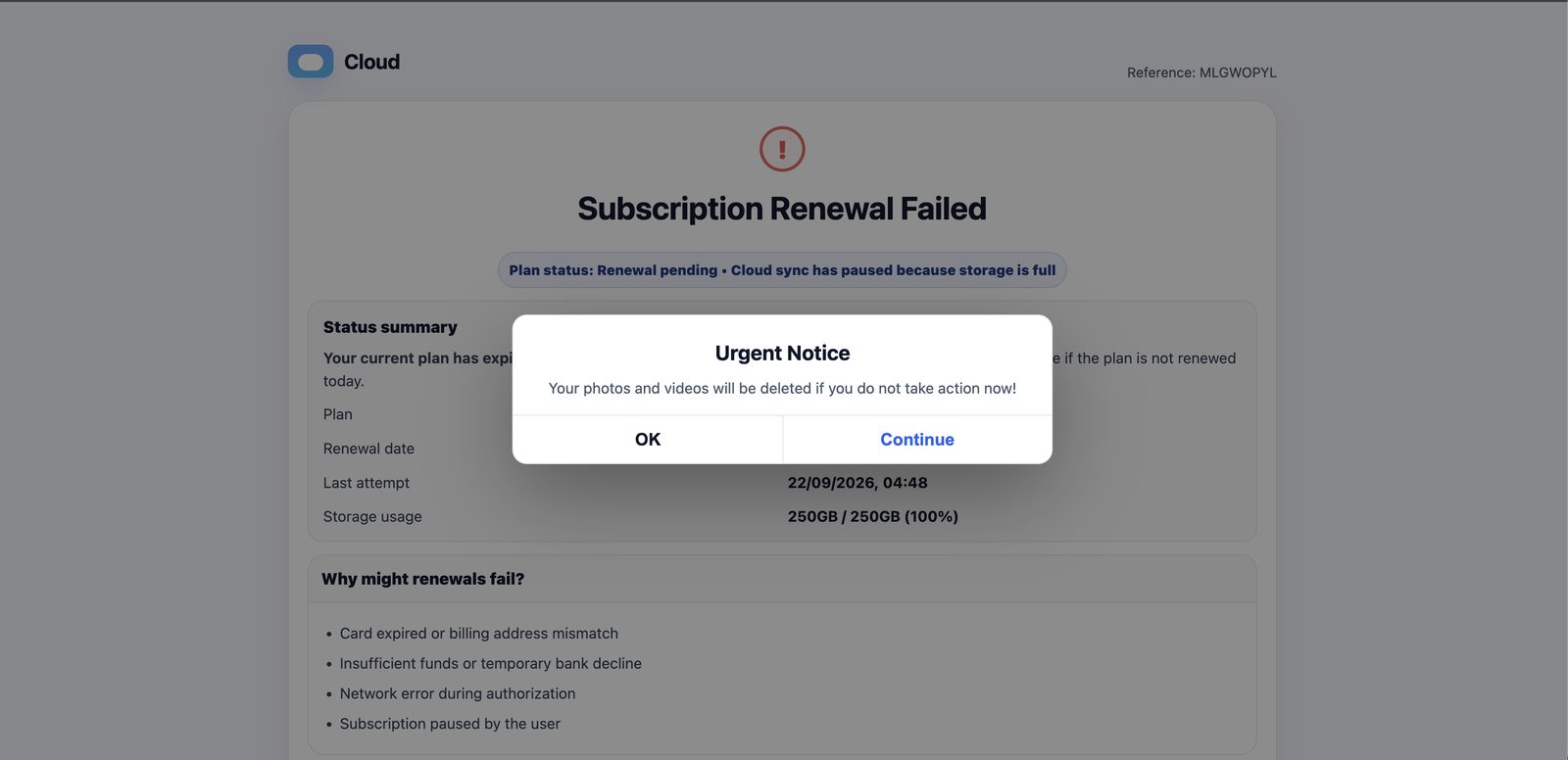
Fake Cloud page with an Urgent Notice pop-up warning that photos and videos will be deleted

The page opens on a generic "Cloud" brand with a random reference code, MLGWOPYL. A pop-up styled like a native iOS or macOS system alert appears immediately: "Your photos and videos will be deleted if you do not take action now!" It offers both "OK" and "Continue", but either choice keeps the victim on the scam page.

Stage 2: The fake renewal page (06:49:25)
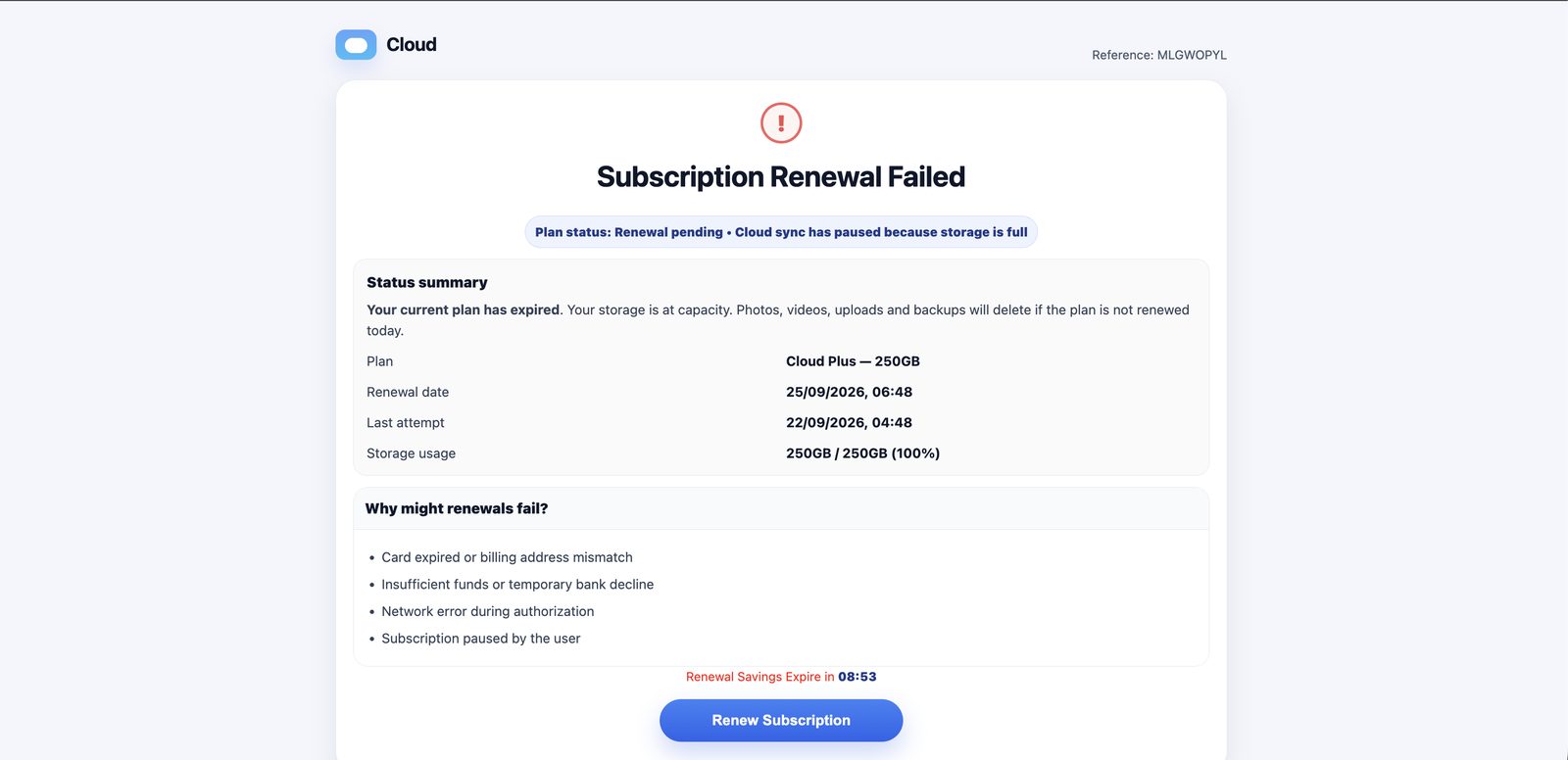
Subscription Renewal Failed page showing plan details, storage at 100% and a countdown timer

The page claims "Subscription Renewal Failed" for a "Cloud Plus — 250GB" plan with storage at 250 GB / 250 GB (100%). Several details give it away:

  • Dates generated from the visitor's clock. The page was opened at 06:48 IST. It showed a "last attempt" at 04:48 that day (exactly 2 hours earlier) and a "renewal date" of 25/09/2026, 06:48 (exactly 3 days later). JavaScript computes these from the current time, so every visitor sees a failed charge that happened just recently.
  • A real, running countdown. "Renewal Savings Expire in" showed 09:19 at 06:48:59, 08:53 at 06:49:25 and 08:41 at 06:49:37. It ticks down in real time from about 10 minutes at page load, to rush the victim.
  • Contradictory story. The plan "has expired" yet the renewal date is in the future. The email blamed a declined payment, while the page blames full storage.
  • The word "savings". Real billing systems don't offer expiring discounts on a failed charge. This is the first hint that the funnel ends in a sales pitch.

Stage 3: The reassurance pop-up (06:49:37)
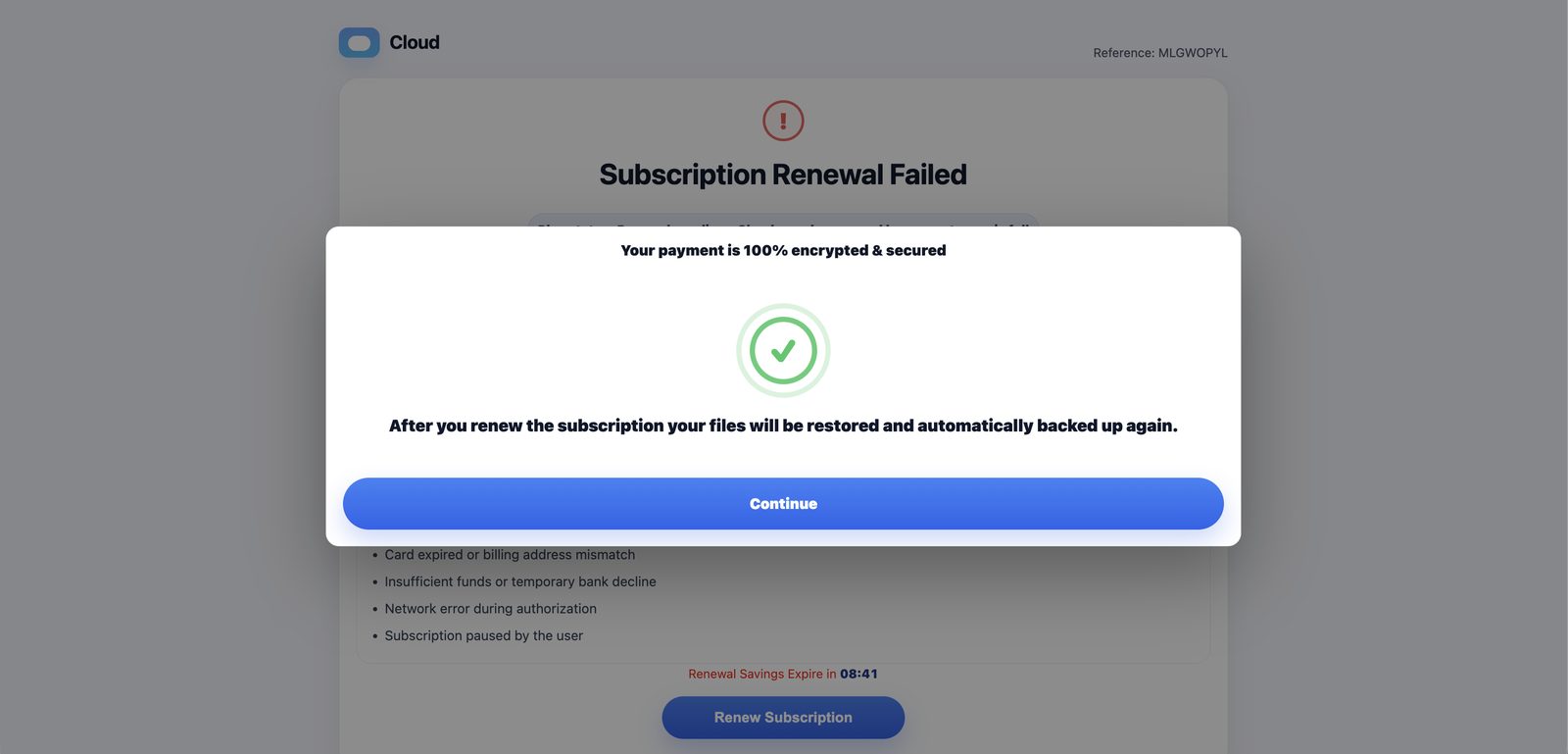
Pop-up claiming the payment is 100% encrypted and secured, with a Continue button

Clicking "Renew Subscription" opens a modal saying the payment is "100% encrypted & secured" and that files "will be restored and automatically backed up again". There is no payment form here. The pop-up exists only to calm the victim right before the hand-off.

Stage 4: The redirect to an antivirus offer (06:49:58)
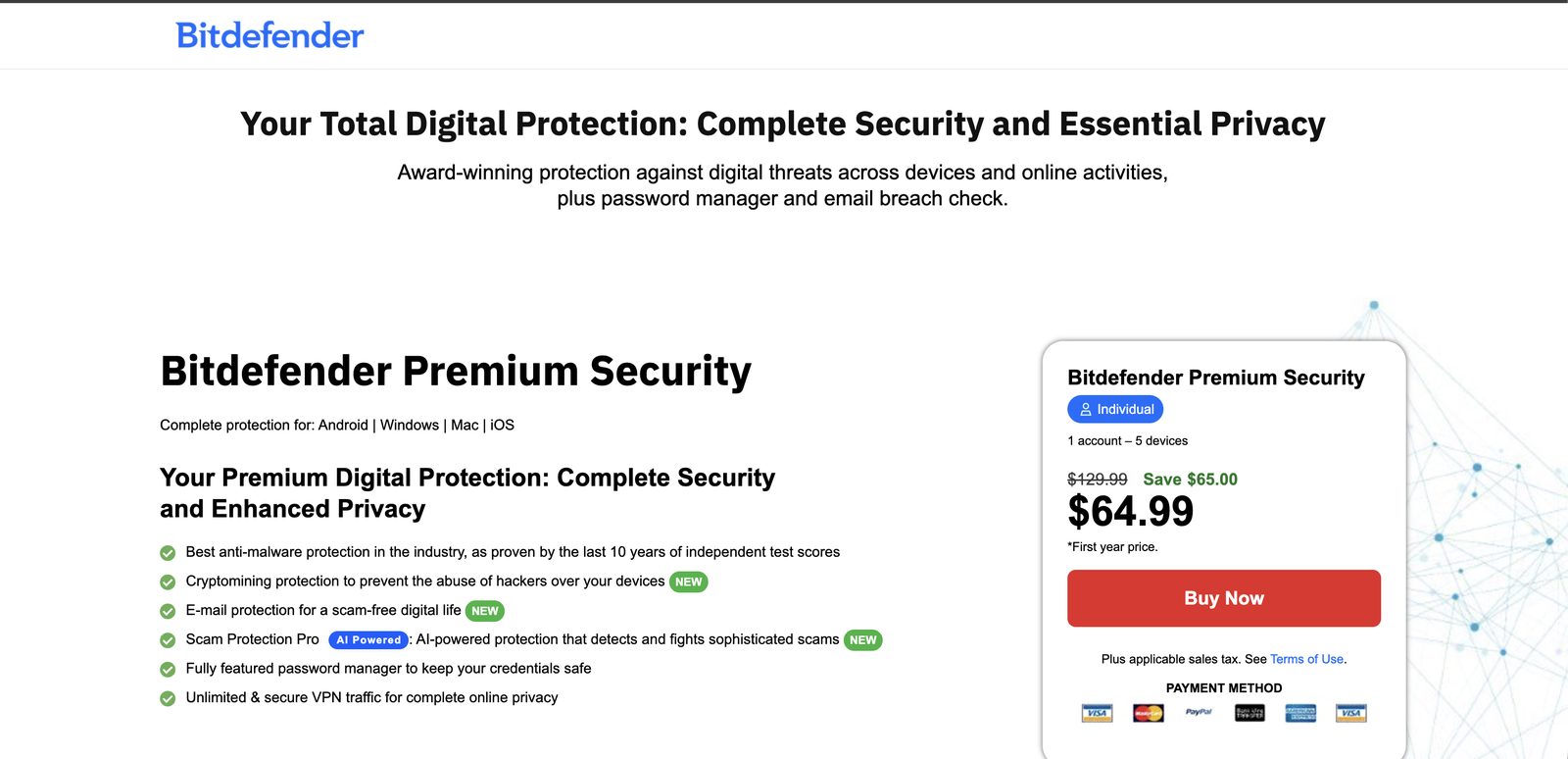
Bitdefender Premium Security sales page showing a discounted first-year price of $64.99

"Continue" leads to a Bitdefender Premium Security sales page priced at $64.99 for the first year, down from $129.99. The cloud storage story disappears completely.

This is a well-known monetisation model for storage-full scams. The operators join affiliate programs and earn a commission on every sale they drive, using fear instead of advertising. Bitdefender is not involved in the campaign; its brand is being abused. Scam traffic of this kind usually passes through a traffic distribution system that decides where to send each visitor. Another victim, or the same one on a different day, may land on a different product or on a card-harvesting form.

The screenshot does not show the final URL, so we cannot yet confirm whether this was the vendor's genuine store reached through an affiliate link or a cloned checkout page. The low-resolution payment icons, with the Visa logo shown twice, are worth a closer look. Either way, victims should not buy anything reached through this funnel.

Indicators of compromise

All URLs are defanged. Bucket names and sending domains rotate quickly, so treat these as hunting leads rather than long-lived block entries.

Type Indicator Notes
IPv4 8.235.84.97 Sending host, Google Cloud VM
rDNS 97.84.235.8.bc.googleusercontent[.]com Google Cloud compute PTR
Domain sproutnews[.]com HELO, From and Message-ID domain
URL hxxps://storage.googleapis[.]com/jjmicdgo/m "Reactivate Today" entry point
URL hxxps://storage.googleapis[.]com/jjmicdgounsb/m Fake "Unsubscribe" link
Subject Payment Declined: Avoid Automated File Cleanup Exact subject line
Display name Cloud Payment Alerts Sender display name
Body string your account September be subject to automated file cleanup Kit find-and-replace artifact
Body string Action Required: Payment Overdue For Banner text, month appended
Landing string Renewal Savings Expire in Countdown label on the funnel page
Landing string Your photos and videos will be deleted if you do not take action now! Fear pop-up text
Message-ID <db9044aa9484450fa72a8658ad927b7a@sproutnews[.]com> Unique to this sample

MITRE ATT&CK mapping

Tactic Technique How it appears here
Resource Development T1583.006 Acquire Infrastructure: Web Services GCS buckets host the funnel entry points
Resource Development T1583.003 Acquire Infrastructure: Virtual Private Server Google Cloud VM sends the mail
Initial Access T1566.002 Phishing: Spearphishing Link Email links to the external scam funnel
Execution T1204.001 User Execution: Malicious Link Victim must click "Reactivate Today"
Defense Evasion T1036 Masquerading Generic cloud-billing branding and native-looking alert pop-ups
Defense Evasion T1656 Impersonation Poses as the victim's own storage provider's billing team

Detection and protection

No single control stops this campaign, because every piece of it sits on trusted infrastructure. Layer your defences.

For your network and email gateway

  • Score cloud-storage links in email. Flag or rewrite messages that combine a billing or urgency subject with links to storage.googleapis.com, *.blob.core.windows.net, *.s3.amazonaws.com or similar object-storage hosts. Legitimate billing mail almost never links to a raw storage bucket.
  • Check sender and infrastructure alignment. Raise the spam score for mail whose HELO domain does not match its reverse DNS, and for mail sent directly from cloud-compute ranges (*.bc.googleusercontent.com, *.compute.amazonaws.com) rather than a known mail provider.
  • Enforce authentication. Quarantine mail that fails SPF or DMARC alignment. Treat unsigned mail claiming to be billing or payment notices with extra suspicion.
  • Inspect content at the web layer. Detect landing pages that pair client-side countdown timers with fear text such as "photos and videos will be deleted". Follow redirect chains to their final destination instead of trusting the first hop.
  • Hunt with the IOCs above. Search mail logs for the subject line, the sproutnews.com sender domain, and the kit string "your account September be subject".

For users

  • Never pay through an email link. Open your storage app or type the provider's address yourself to check your billing status.
  • Watch for unbranded alerts. A real provider always names itself. "Cloud Services" with no brand is a red flag.
  • Countdown timers are a sales tactic. Real billing systems don't offer "savings" that expire in 10 minutes.
  • Don't click "Unsubscribe" in suspicious mail. Report it as phishing instead.
  • If you already paid, contact your bank to dispute the charge and block the card, and watch your statements for further unauthorised transactions.

This sample was captured by the GajShield email honeypot, which collects live threats to improve detections across GajShield products. All recipient and sender email addresses have been redacted.

IPS Signature Sep 21, 2026

GajIPS - IPS Signature Update — GS TROJAN: TASK#STOMP PowerShell backdoor C2 and delivery detection

Severity: HIGH · Priority: P2 — probable document-theft backdoor infection, investigate on hit

These rules detect network activity from TASK#STOMP, a Windows backdoor. TASK#STOMP is built for corporate document espionage: it searches the victim's drives for business documents in a specific priority order (Word files first, then PDFs, PowerPoint, and Excel), uploads them continuously to attacker infrastructure, and persists through at least five separate footholds — four scheduled tasks with names imitating Windows components and a copy of itself in the Startup folder — so that removing any single one leaves the others to rebuild the infection. Beyond document theft it steals saved Wi-Fi credentials, clipboard content, and screenshots, and executes whatever commands its operators send. The malware lives in a folder named to resemble a Windows Defender service directory. No attribution to a known threat actor has been made; researchers assessed the targeting pattern as consistent with procurement or tender-sector espionage based on the decoy domain used.

A hit on the domain, SNI, or C2-protocol rules indicates a probable active infection: identify the device, isolate it, and treat its contents as exfiltrated — assume all business documents reachable from its drives have been uploaded to the attacker. From a known-clean device, reset any credentials stored on the machine. Do not rely on deleting a single file or scheduled task to clean the infection; the five-persistence design means incomplete removal leaves the backdoor intact. Rebuild is the safest remediation. Separately, users who work with Iran-related procurement, tenders, or contracts should be informed of this campaign's apparent targeting interest.

Antivirus Sep 21, 2026

GajAV - Malware Signature — ArtlistClickFix native RAT delivery chain (Win.Trojan.ArtlistClickFix.*)

Severity: HIGH · Priority: P2 — probable ClickFix compromise, investigate on hit

These signatures detect components of a ClickFix malware campaign documented by researcher, in which attackers compromised a high-traffic website and injected a fake human-verification overlay that instructed Windows visitors to paste and run a PowerShell command. That command downloaded a password-protected archive containing a legitimate binary that was abused to side-load malicious DLLs, which decoded and executed shellcode in memory, ultimately installing a remote-access trojan giving the attacker full control of the victim's machine. The attack used EtherHiding — storing the live command-server address inside a Polygon blockchain smart contract — so that taking down any individual server does not sever attacker access and the campaign remains resilient against conventional takedown. These signatures identify components of the delivery chain and payload by exact fingerprint: the dropper archive, DLL side-loading components, decoded shellcode, loader, and the remote-access trojan itself.

If GajAV flags one of these files, treat it as a probable active or recent ClickFix compromise: identify the device and check whether the user recently ran an unfamiliar command from a CAPTCHA-style web prompt. Because the attacker achieves full remote access with the installed RAT — with capabilities including credential theft, keylogging, screen streaming, hidden-desktop interaction, and SOCKS proxying — treat the machine as fully compromised. Isolate it, and from a known-clean device reset any credentials the machine held, including browser-saved passwords, cloud tokens, and cryptocurrency wallets. Rebuild the machine rather than attempting in-place removal, since the RAT and its persistence mechanisms operate at a level that makes safe recovery difficult to verify. Review the website the user visited and report the compromise to the site owner.